
The Tesla PowerWall 3 solar PV inverter and battery storage system provides the ability to automatically disconnect from the grid and power the site from its batteries in the event of a grid outage – including topping up the batteries from solar generation during the outage. The component that handles this is the Backup Gateway 2 which is installed next to the meter, in the outdoor GRP cabinet.
The installation engineer was very positive about the performance of the switch-over from Grid supply to Battery supply, based on their experience testing this by manually triggering a switch-over while the grid connection was still live, with no flickering of lights or resetting of appliances. The official Tesla specifications (which I’m struggling to find to reference here) are much less optimistic and note it can take a few seconds to switch in a real-world power outage scenario – especially when there’s a brown-out rather than a clean break in the supply. Clearly that’s long enough for most appliances to reset.
It’s typical to have a couple of short-duration power outages every year – perhaps as a consequence of the overhead 11kV supply and the way that is connected to the rest of the grid. When the grid power went away for a second or two the other day the Backup Gateway did not react (at all? – there was certainly no message to say it had gone off-grid) and the network switch and router in the Outbuildings lost power for long enough to reset. The equivalent devices in the House are already protected by an Uninterruptible Power Supply (UPS) so stayed online.
That prompted me to add a UPS to the networking equipment in the Outbuildings – something I was planning to do anyway, but I had decided to wait for some real-world experience first (in case the Backup Gateway did react quickly enough after all).
I’ve had good experience with second-hand APC UPS equipment over many years and the smallest and cheapest APC model I could find on eBay was the Back-UPS CS BK350EI which runs from a single 12V 7Ah lead-acid battery (very widely used as backup batteries for alarm systems so readily available and competitively priced). While this UPS is only rated for 210W and won’t run for more than a few minutes at full load it seems perfect for covering a few seconds of outage while the Backup Gateway kicks in, powering the Outbuildings’ network router and network switch (including the CCTV cameras and Wireless Access Points supplied via PoE from that switch).
While a rack-mount UPS would have been nice, those tend to be much more expensive and – importantly – the smaller rack-mount models need much more expensive batteries.
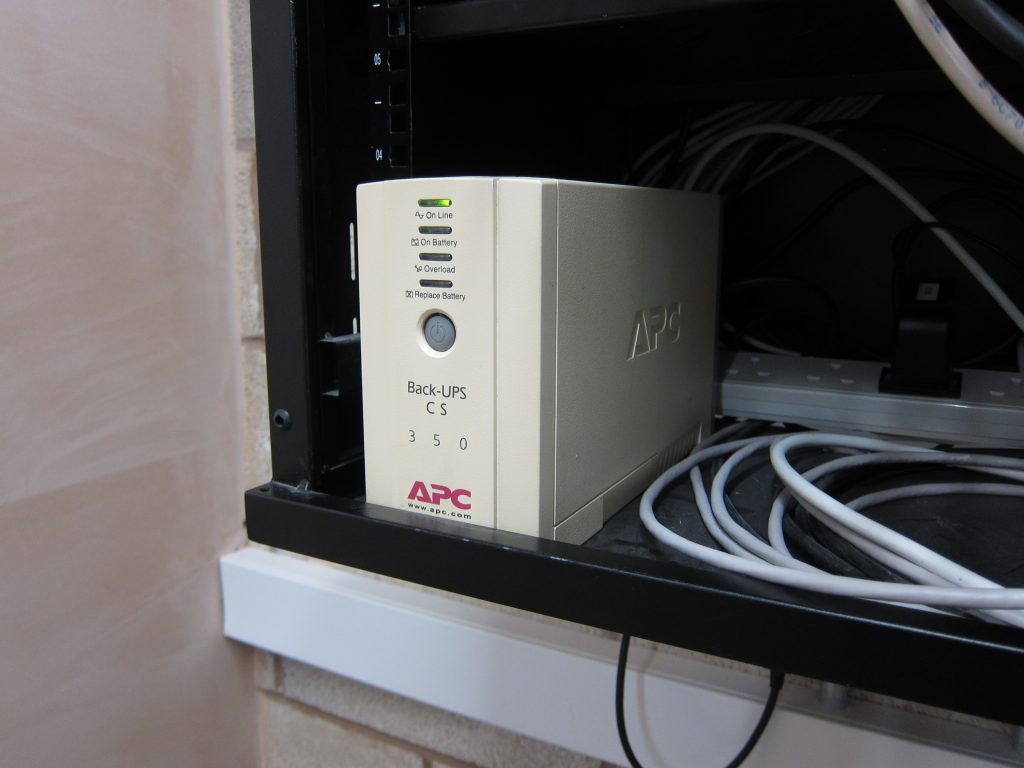
The UPS was only £17.99 without a battery (including free shipping) and a new Yucel 12V 7Ah battery was only £15.49 from a local electrical wholesaler that specialises in alarm system equipment and hence has a pretty quick stock turnover for those. (The same battery would have been £27.49 from Screwfix/Toolstation, with more risk of getting one that has been in stock for months.)
The APC BK350EI UPS has three IEC 60320 Type F socket outlets (in fact the photo on that Wikipedia page is of an almost identical UPS) – plus another socket that is only surge-protected, not also battery-backed. It was supplied with two Type E to C13 cables which are ideally suited to powering devices like the UniFi network switch which has a C14 plug connector. In order to power devices which demand a standard UK BS 1363 socket (e.g. because they use a power adaptor integrated into a BS 1363 plug) it’s necessary to use an extension lead with a Type E socket. While re-wirable Type E sockets are available (and I’ve used a good quality one successfully before – and struggled with poor quality ones) it’s generally better to cut the C13 connector off the end of a pre-made Type E to C13 cable and wire that to something like a 3-way socket outlet adaptor.
These small APC UPS devices don’t support the ‘SMART’ monitoring network cards which the larger models (aimed more at business deployments) do, but they still provide an option for USB connectivity via a non-standard cable (APC AP9827) with an RJ50 (like an RJ45 but 10-way) plug at the UPS end and a USB Type A connector at the other end. Genuine APC cables are very expensive but much cheaper equivalents are available via eBay. While an 8-way RJ45 plug will physically fit into a 10-way RJ50 socket and only 4 pins are actually wired, those include pins 1 and 10 so it does need to be a 10-way plug.
 Tesla PowerWall Backup Gateway Grid Outage Detection – UPS Still Required by Marsh Flatts Farm Self Build Diary is licensed under a Creative Commons Attribution-ShareAlike 4.0 International License.