The Ground Source Heat Pump (GSHP) is a NIBE F1145 unit which supports the NIBE Uplink facility – which basically means the unit connects to the Internet, uploads status information on a regular basis and permits some degree of remote control.
Data can be accessed at the website, via an iOS or Android app and also via an API. While the apps are handy it’s the API that holds the potential to integrate the data from the heatpump into a wider domestic monitoring scheme.
I get the impression the main purpose reason for having an API is to support the mobile apps and it’s evident the apps are using it under the covers but kudos to NIBE for making it available for other developers to use. It uses fairly standard Internet API technologies like REST, JSON and OAuth2 but it’s not particularly mature and not perfectly documented so the learning curve is relatively steep.
After a few hours of trial and error I’ve got it working from a Perl script and it’s currently logging temperature data via MQTT into InfluxDB from where I can easily graph it using Grafana – sample below showing the heat pump firing to top-up the temperature on the hot water tank (click the image to enlarge) – the graph is a bit “lumpy” since I’m currently only grabbing data every 5 minutes, though that’s configurable.
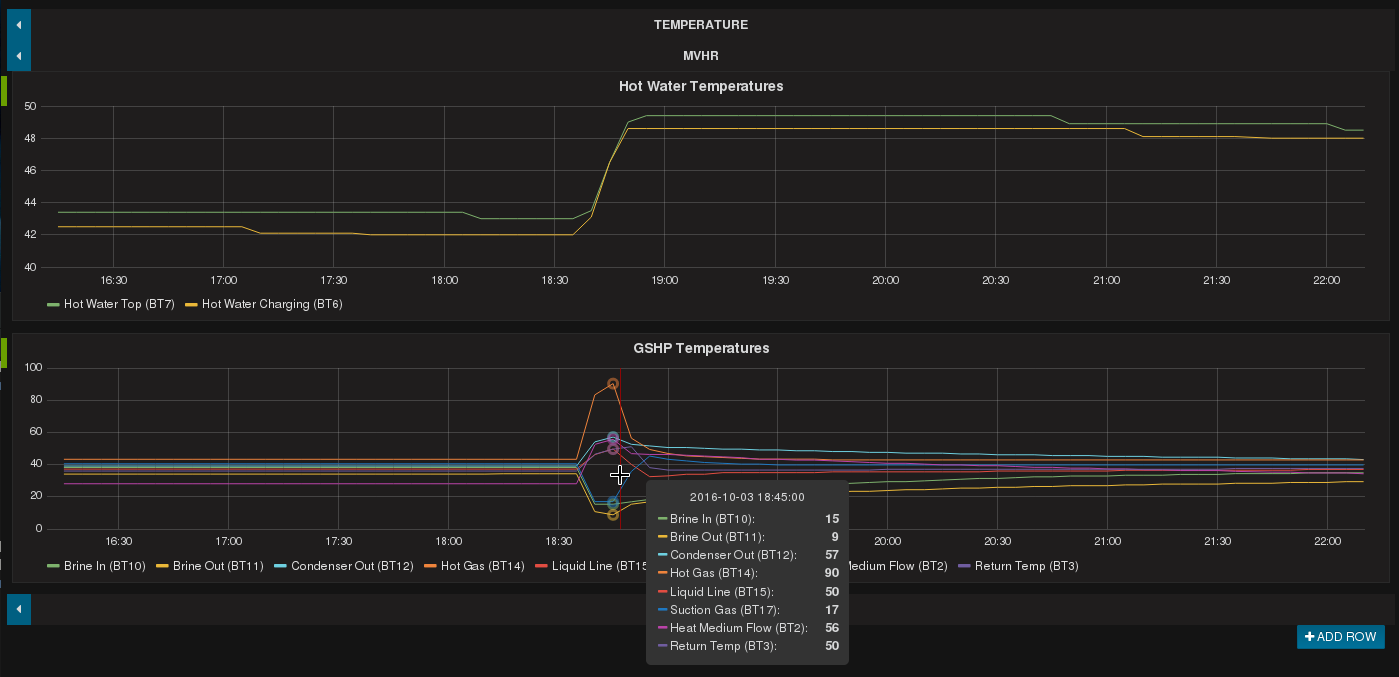
Grafana display of GSHP data from NIBE Uplink API
The biggest hurdle was getting the authentication scheme working – OAuth2 permits a program to make requests on behalf of a user without asking for their password all the time – but that was new to me, and it’s a little idiosyncratic. Perl module LWP::Authen::OAuth2 helped a lot and in particular that takes the pain out of handling token renewal when making API calls.
UPDATE: I’ve now written a separate Technical Article on this topic which includes some sample script code and a HOWTO guide. See here.