Gary recently left a comment against the Rainwater Harvesting – Summary after 4 Months of Operation post suggesting it would be a good idea to log the number of times the rainwater pump gets started. This would monitor the effectiveness of the expansion vessel in avoiding the need to start the pump for every water draw-off and could indicate when that vessel needs maintenance.
The most robust way to do this would be to connect a 230V sensor in parallel with the pump’s switched electrical input and then use a microcontroller to count the number of times the sensor sees a transition from no voltage to mains voltage. A 230V KNX Binary Input module such as the MDT BE-04230 can be configured as a ‘counter’ and could automatically present a count of pump start cycles to the KNX Bus, for onward processing by Home Assistant – but those modules are expensive (about £100). It would also be challenging to connect to the switched electrical input for the pump, since this is via a European-style electrical socket integrated into the pump controller unit in an environment which is prone to getting splashed with water.
Given that this is a nice-to-have rather than an essential metric (and so 100% accuracy is not required) a better solution is probably to infer the number of pumps starts from one or more of the other metrics already being collected for the rainwater harvesting system:
- The water level in the rainwater tank
- The volume of water drawn off from the tank, separately in the House and the Outbuildings
- The electricity usage by the rainwater pump
- The pressure in the rainwater pipework generated by the pump and maintained by the expansion vessel (and the non-return valve on the pump outlet)
Of these, it is the pressure sensor which looks most promising as a source of data to infer the number of pump starts:
- The electricity and water meters are ‘polled’ every minute – which is fine for tracking the incrementing counters for kWh and volume but no good for spotting something like the pump current draw suddenly increasing as the motor starts
- The pressure sensor is connected to a KNX Analogue Input-Output module which is constantly checking the reading but which only publishes an update to the KNX Bus when the reading changes
- This is the most efficient way of handling unpredictable updates such as this, rather than constantly polling just in case the value has changed
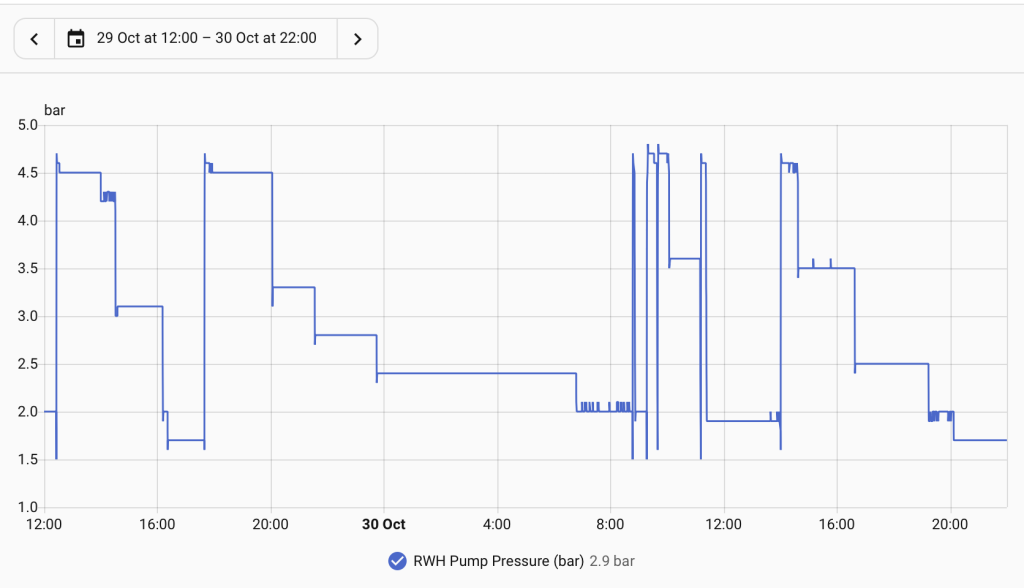
- From looking at the graph of pipework pressure over time it is clear when the pump runs, so it should be relatively straightforward to create some logic to automatically check for that ‘signal’
A sample graph for a couple of days in late October is shown below, with each tall vertical ‘step’ corresponding to a pump run. Toilet flushes gradually reduce the pressure in stages as those get serviced by the expansion vessel – until that is empty – whereas larger draw-offs from the washing machine or an outside tap typically require the pump to start almost straight away. In every case, it is the sudden increase in pressure to about 4.5 bar which signifies the pump has been running.
Home Assistant includes features which were presumably intended for creating thermostat-type controls – spotting when a metric passes a threshold value (e.g. a temperature gets too low) and triggering an action (like turning on a heater). The generic trigger for Numeric State Threshold Crossed looks ideal for monitoring the pressure reading, especially since the documentation states:
This trigger fires when a value crosses a threshold. It does not keep firing while the value stays on the same side of the threshold.
and
If you use an entity in Above (
above) or Below (below), Home Assistant compares the value of the watched entity against the value of that entity only when the watched entity updates.
So, in summary:
- Whenever an updated pressure reading arrives in Home Assistant (by being published to the KNX Bus) this can be checked by a Numeric State Threshold Crossed automation
- If that reading is above a threshold – say 4.0 bar – a counter for the number of pump starts can be incremented
The YAML code for the Home Assistant automation (generated from the visual editor) looks like this:
alias: Count RWH Pump Starts
description: >-
  Look for increases in the pressure sensed within the rainwater distribution
  pipework and count the number of times the pressure increases above the
  defined threshold
triggers:
  - trigger: numeric_state
    entity_id:
      - sensor.rwh_pump_pressure_bar
    above: 4
conditions: []
actions:
  - action: counter.increment
    metadata: {}
    target:
      entity_id: counter.rwh_pump_start_count
    data: {}
mode: single
The counter is just a ‘virtual entity’ – what Home Assistant calls Helpers – that can be included in a dashboard or used in further calculations. Gary mentioned either pump starts per day or pump starts per litre of water delivered as being useful derived metrics; those are not yet defined, but could be.
It’s early days but the automation has successfully spotted two ‘simple’ pump start cycles. The more challenging ones are when the washing machine takes in a lot more water but does that in several short bursts (while it works out how absorbent a particular load of laundry is) which makes the pump start a few times over the course of a few minutes.